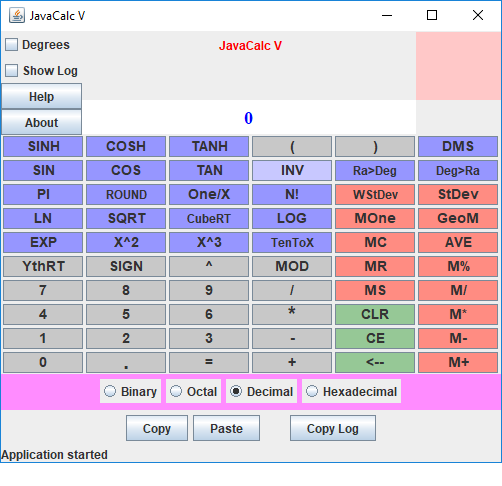
JavaCalc V Ap
This page was designed before it became impossible to use applets on web pages.
So, unfortunately, you will probably be unable to run the program on the web page.
Instead you will need to download the zip file. You can run the applet using this
command at a DOS prompt in the subfolder:
appletviewer JavaCalc5.html
Alternatively, you can run it as an application using its jar file by typing the
following at a DOS prompt:
java JavaCalc5 -jar
In Windows, you may be able to run the ap by just double clicking on the
JavaCalc5.bat file in the folder holding the files.
James Brink, July 27, 2018
An advanced scientific calculator with almost all the features of the scientific mode of the Windows calculator plus
There is just one Java program but it can be used in 2 different ways:
Because there are certain security risks posed by some Java applets and applications, in some cases you will be warned about the those risks in a manner that makes it seem more dangerous than it really is.
James Brink, retired professor
Department of Computer Science and Computer Engineering
Pacific Lutheran University,
Tacoma, Washington
brinkje@plu.edu
In order to run any of the following, Java must be enabled on your browser.
It possible to download the application's zip file, expand it and run the calculater directly on your computer.
See also: Need to convert measurements from on unit to another? the Converter can convert length, area, volume, temperature, speed, weight, and pressure units for you.